How to Find SUID Files on Linux and Which Ones Are Dangerous
To find SUID files on Linux, run find / -perm -4000 -type f 2>/dev/null. The command lists every program that runs with its owner's privileges, rather than the privileges of the user who starts it. Most results are expected, such as passwd and sudo. Any program that is not on the usual list, or that can run commands or read files for you, is a way for any user to become root. This post shows you how to find SUID files, read the results, and decide which ones are dangerous.
What the SUID bit does
The set user ID (SUID) bit is a special permission on an executable file. When you run a SUID program, the kernel gives the new process the file owner's user ID as its effective user ID. Since most SUID programs are owned by root, they run as root whoever starts them. The credentials(7) manual page explains how real and effective user IDs work.
SUID exists for a good reason. /usr/bin/passwd lets you change your own password, which means writing to /etc/shadow. Only root can write to that file, so passwd needs root's privileges for a moment. The program itself checks that you only change your own password.
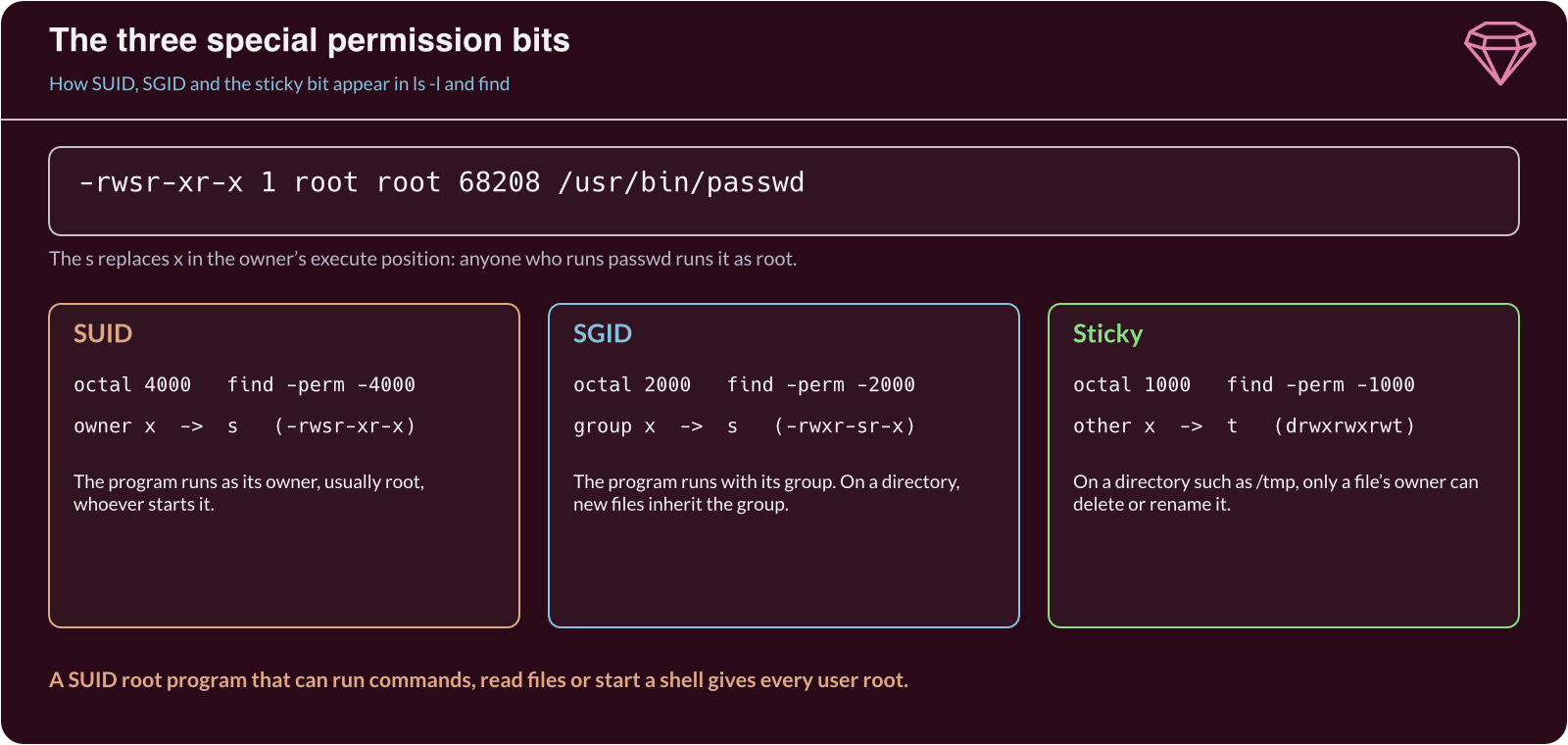
There are three special permission bits, and ls -l shows each one in place of an x:
- SUID (octal 4000). An
sin the owner's execute position. The program runs as its owner. - SGID (octal 2000). An
sin the group's execute position. The program runs with the file's group, and new files in an SGID directory inherit its group. - Sticky bit (octal 1000). A
tin the others' execute position. In a shared directory such as/tmp, only a file's owner can delete or rename it.
You can see the SUID bit on passwd with ls -l:
ls -l /usr/bin/passwd
-rwsr-xr-x 1 root root 68208 Feb 6 2026 /usr/bin/passwd
A capital S instead of s means the SUID bit is set but the owner has no execute permission. The bit then does nothing useful, and it usually points to a mistake.
Find SUID files with find
find can search for files by their permission bits. The -perm -4000 test matches any file with at least the SUID bit set. Add -type f to skip directories, and send errors to /dev/null so that "Permission denied" messages do not hide the results:
find / -perm -4000 -type f 2>/dev/null
Run it with sudo if you want to be sure of seeing every file, since some directories are not readable by ordinary users. To include the owner and permissions in the output, add -exec ls -l {} +. To find SUID and SGID files in one pass, use -perm /6000, which matches a file with either bit set. The find(1) manual page explains the difference between -perm -mode and -perm /mode.
Here is the output from an Ubuntu server:
/usr/bin/chfn
/usr/bin/chsh
/usr/bin/fusermount3
/usr/bin/gpasswd
/usr/bin/mount
/usr/bin/newgrp
/usr/bin/passwd
/usr/bin/pkexec
/usr/bin/su
/usr/bin/sudo
/usr/bin/umount
/usr/lib/openssh/ssh-keysign
/usr/local/bin/find
Every line except the last belongs to a standard package. /usr/local/bin/find does not. It sits in a directory for locally installed software, and find has no reason to run as root.
Which SUID files are dangerous
Judge each result with three questions.
Does it belong to a package? Ask the package manager which package installed the file. On Debian and Ubuntu, use dpkg -S. On Red Hat-based distributions, use rpm -qf:
dpkg -S /usr/bin/passwd /usr/local/bin/find
passwd: /usr/bin/passwd
dpkg-query: no path found matching pattern /usr/local/bin/find
A SUID file that no package owns was put there by a person. That might be an administrator with a reason, or a threat actor leaving a way back in.
Can it run commands or read files? Programs such as find, vim, less, python3, bash and cp can start a shell, run a command or read any file. If one of them runs as root, so does everything it starts. The GTFOBins project lists which common programs can be abused this way when the SUID bit is set. Treat any SUID program on that list as an immediate finding.
Is it up to date? Even a standard SUID program is dangerous when it has a known flaw. PwnKit (CVE-2021-4034) let any local user become root through pkexec, and Baron Samedit (CVE-2021-3156) did the same through sudo. Both programs sit on almost every Linux system, which is why patching them matters.
Fix what you find
Once you have a list, take the smallest step that removes the risk:
- Remove the SUID bit from a program that does not need it, with
sudo chmod u-s /usr/local/bin/find. - Delete any copy of a standard program that someone has placed elsewhere with the SUID bit, after you have recorded it as evidence.
- Remove packages you do not use, such as
pkexecon a server with no desktop, so their SUID programs go too. - Mount
/tmp,/homeand removable media with thenosuidoption, so SUID bits on those file systems are ignored.
Then save a baseline you can compare against later:
sudo find / -xdev -perm /6000 -type f 2>/dev/null | sort > suid-baseline.txt
-xdev keeps find on one file system, which stops it from wandering into network shares. Run the same command on a schedule and use diff to compare the new list with the baseline. A new SUID file is something to investigate straight away.
Some programs no longer need SUID at all. Modern distributions give ping the narrower cap_net_raw capability instead, so it can send network packets without full root privileges. getcap -r / 2>/dev/null lists files with capabilities, and the capabilities(7) manual page explains what each one allows.
Security considerations
Threat actors search for SUID files as soon as they gain a foothold, because one misconfigured program can turn a low-privileged account into root. MITRE ATT&CK lists this as Setuid and Setgid (T1548.001). Threat actors who already have root also set the SUID bit on a copy of a shell, so they can get root back later from any account.
Check only systems you own or have written permission to test. Running these searches on someone else's server, or using a SUID program to gain root there, is a criminal offence in most countries, including under the Computer Misuse Act 1990 in the UK.
To defend your own systems:
- Keep the list short. Remove SUID programs and packages you do not need.
- Patch SUID programs quickly. A flaw in
sudo,pkexecormountaffects every user on the system. - Monitor for change. Compare SUID files against a baseline, and alert on new ones.
- Use
nosuidmounts. Stop SUID bits on file systems that users can write to.
If you are new to Linux permissions, the Introduction to Linux module covers how users, groups and file permissions fit together. Our post on checking listening ports covers another quick check of a Linux server's attack surface.
Further reading
- find(1) – The full list of tests, including how
-permmatches permission bits. - chmod(1) – How to set and remove the SUID, SGID and sticky bits.
- GTFOBins – Which common programs can be abused when they run with the SUID bit.
- Setuid and Setgid (T1548.001) – MITRE ATT&CK's description of the technique and how to detect it.
