How to Check Listening Ports on Linux with ss and lsof
Every service that accepts network connections on a Linux server opens a listening port. A listening port is a numbered socket that waits for clients to connect. Each one is part of the server's attack surface, so you should know what is listening and why. This post shows you how to list listening ports with ss and lsof, read the output, and close the ones you do not need.
What a listening port is
A port is a number from 0 to 65535 that, with an IP address, identifies one service on a host. A service listens when it has bound a socket to an address and port and is waiting for connections. Transmission Control Protocol (TCP) sockets show the state LISTEN. User Datagram Protocol (UDP) has no connections, so UDP sockets that wait for traffic show the state UNCONN.
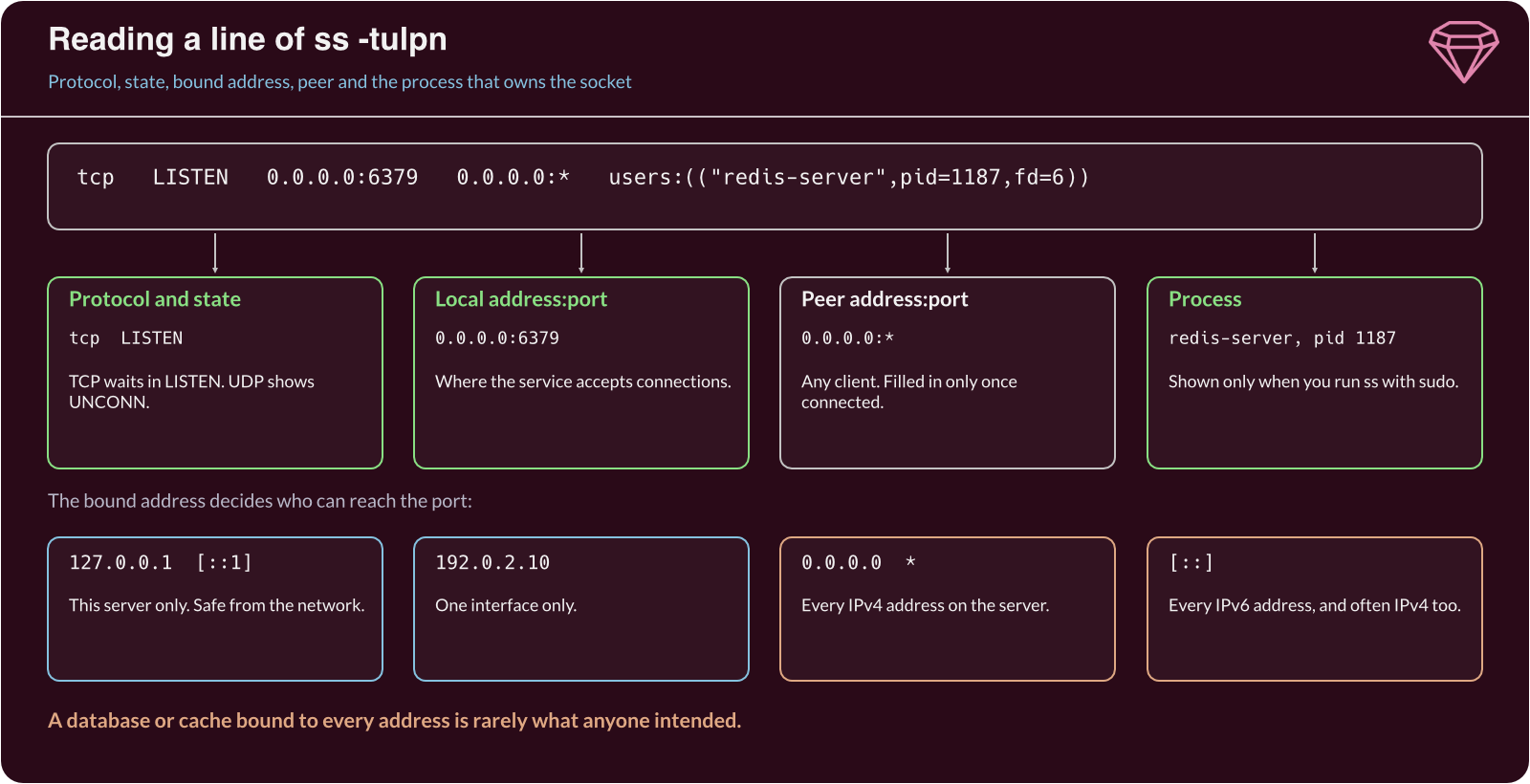
The address a service binds to matters as much as the port:
0.0.0.0or*. The service accepts connections on every IPv4 address the server has.[::]. The same for every IPv6 address, and often IPv4 as well.127.0.0.1or[::1]. The service accepts connections only from the server itself.- A specific address, such as
192.0.2.10. The service listens on that one interface only.
A database bound to 127.0.0.1 is safe from the network. The same database bound to 0.0.0.0 is reachable by anyone who can route to the server.
List listening ports with ss
ss is the standard tool on modern distributions and replaces the older netstat. Run it with sudo, because only root can see which process owns every socket:
sudo ss -tulpn
The options each do one thing. -t and -u show TCP and UDP sockets, -l shows only listening ones, -p shows the owning process, and -n prints numbers instead of service names. The ss(8) manual page lists the rest.
Netid State  Local Address:Port   Peer Address:Port Process
udp   UNCONN 127.0.0.53%lo:53          0.0.0.0:*    users:(("systemd-resolve",pid=612,fd=13))
tcp   LISTEN       0.0.0.0:22          0.0.0.0:*    users:(("sshd",pid=901,fd=3))
tcp   LISTEN     127.0.0.1:5432        0.0.0.0:*    users:(("postgres",pid=1104,fd=6))
tcp   LISTEN       0.0.0.0:6379        0.0.0.0:*    users:(("redis-server",pid=1187,fd=6))
tcp   LISTEN             *:80                *:*    users:(("nginx",pid=1250,fd=7))
Read each line from left to right: protocol, state, the address and port it listens on, and the process. Here SSH and nginx are open to the network, as you would expect. PostgreSQL listens only on the loopback address. Redis on port 6379, however, listens on every address, which is rarely what anyone intended.
To check a single port, add a filter. This shows only sockets listening on port 6379:
sudo ss -tlpn 'sport = :6379'
Cross-check with lsof
lsof lists open files, and on Linux a socket is a kind of open file. It gives a second view of the same data and shows the user each process runs as:
sudo lsof -i -P -n | grep LISTEN
sshd      901    root    3u IPv4  21345 0t0 TCP *:22 (LISTEN)
postgres 1104 postgres   6u IPv4  23011 0t0 TCP 127.0.0.1:5432 (LISTEN)
redis-se 1187   redis    6u IPv4  23502 0t0 TCP *:6379 (LISTEN)
nginx    1250    root    7u IPv6  24120 0t0 TCP *:80 (LISTEN)
-i selects network files, -P keeps port numbers as numbers and -n skips name lookups. The third column is the user, which tells you how much a compromised service could reach.
Trace a port to its service
Once you find an unexpected listener, find out what started it. Take the process ID from ss and ask systemd which unit owns it:
systemctl status 1187
● redis-server.service - Advanced key-value store
     Loaded: loaded (/lib/systemd/system/redis-server.service; enabled)
     Active: active (running) since Mon 2026-10-26 09:14:02 UTC
   Main PID: 1187 (redis-server)
Now you know the package, the unit file and whether it starts at boot. Some ports are opened by systemd itself through socket activation, where systemd listens and starts the service on the first connection. In that case ss shows systemd as the process, and systemctl list-sockets shows which unit each socket starts.
Close or restrict what you do not need
For each listener, decide whether it needs to be there, and whether it needs to be reachable from the network. Then take the smallest step that fixes it:
- Stop and disable an unused service. Run
sudo systemctl disable --now redis-serverso it does not return at the next boot. - Bind a local service to loopback. Set the address in its configuration, such as
bind 127.0.0.1for Redis, then restart it. - Filter the rest with a firewall. Allow a port only from the networks that need it, such as SSH from
198.51.100.0/24.
Run sudo ss -tulpn again afterwards to confirm the change took effect.
Security considerations
Each exposed service is a target. A threat actor who reaches it can try weak credentials or a known vulnerability. CVE-2024-6387, a remote code execution flaw in OpenSSH, showed that even a well-trusted service needs patching.
Threat actors also run these same commands after they gain access, to map what else the host offers. MITRE ATT&CK lists this as System Network Connections Discovery (T1049). A port you did not open can also be a backdoor, so treat an unknown listener as a possible incident until you have traced it.
To reduce the risk, keep a record of the ports each server should have open, and compare ss output against it on a schedule. Patch the services you do expose, and scan your servers from outside to confirm the firewall matches your record.
Further reading
- ss(8) – The full list of options and filters for ss.
- lsof(8) – How lsof selects and prints open files and sockets.
- systemd.socket – How systemd socket activation opens ports for services.
