Analyse DNS Tunneling on the network with WireShark
DNS is one of the most common protocols you'll see on a network. Almost every device uses it, often without you even noticing, that makes it useful for attackers too.
DNS tunnelling is a technique that uses DNS requests and responses to carry data. Rather than simply asking for the IP address of a domain, a compromised system can hide data inside DNS queries and use them as a communication channel.
In this walkthrough, we'll look at a PCAP containing traffic generated by Iodine, a tool designed to tunnel IPv4 traffic through DNS.
We will be using Wireshark to investigate the traffic and identify the signs that something unusual is happening.
What is DNS tunnelling?
Normally, a DNS request is looking to resolve a domain name to an IP address, or get data from TXT records and are then cached by the requester for future use.
With DNS tunnelling, data can be placed inside a DNS request and can have larger payload sizes both sending and receiving.
You might see something more like:
MFRGGZDFMZTWQ2LK.example.com
The long string can contain encoded data. By sending many queries, a tunnelling tool can move data through DNS.
This can be useful to an attacker for command and control or data transfer or even by a knowledgable user that wants to bypass restrictive firewall policies or internet censorship.
The challenge for a defender is that DNS traffic is everywhere. We therefore need to look for unusual patterns, rather than assuming that one strange DNS request is malicious.
Opening the PCAP in Wireshark
Let's start with our Iodine PCAP ( Downloadable Here)
Once the capture is open in Wireshark, there will be plenty of traffic to look through.
Our first step is to filter for DNS:
dns
This removes most of the unrelated traffic and lets us focus on the DNS requests and responses.
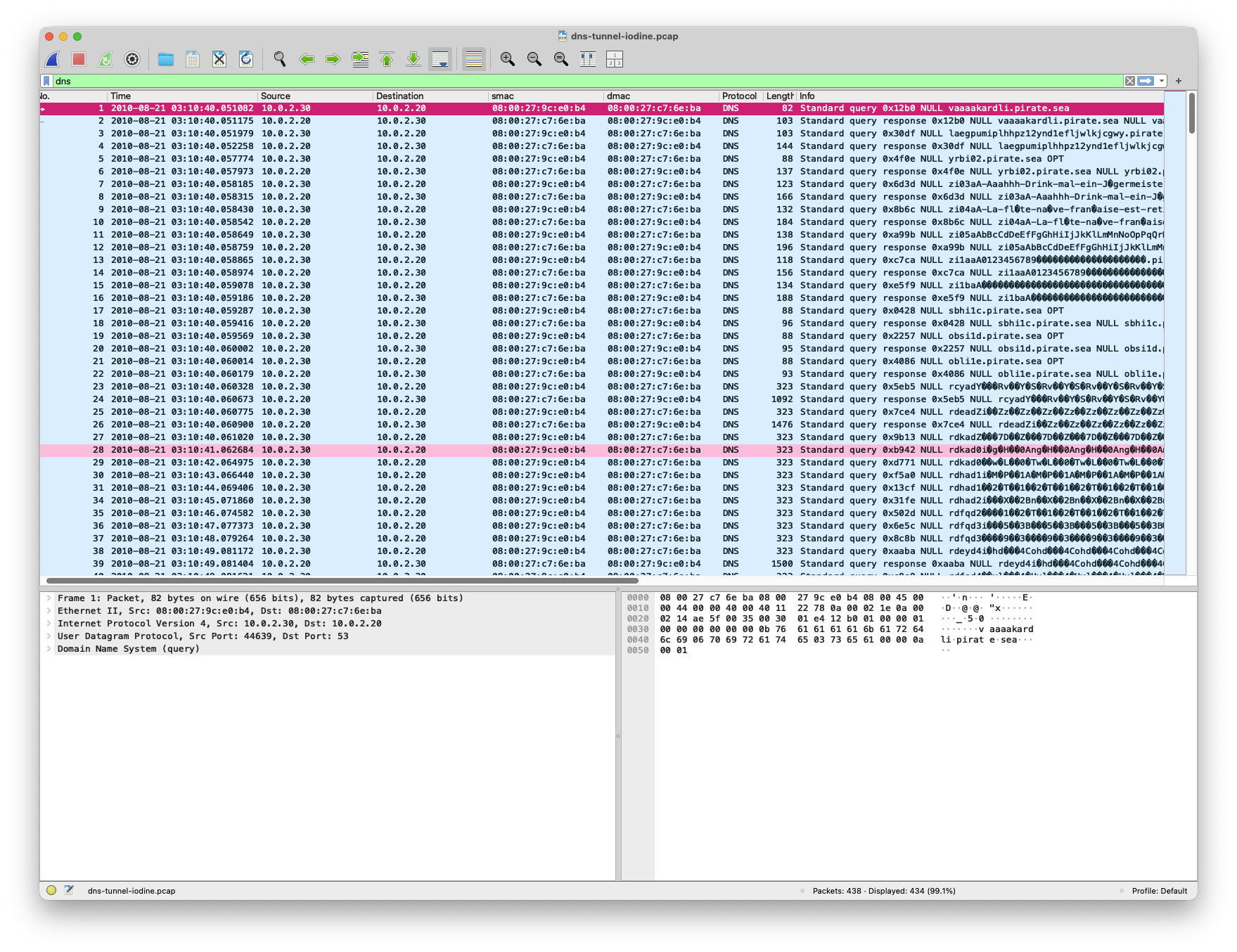
At first glance, the amount of DNS traffic is already interesting with 99% of the PCAP being DNS traffic.
But volume alone isn't enough to identify tunnelling. Most networks generate a large amount of DNS traffic during normal operation.
We can see that there are a few unknown characters in the Info column, which could be an indicator for tunnelling or maybe character sets from other languages.
Looking at the DNS queries
One of the first things to investigate is the query name.
In Wireshark, you can use:
dns.qry.name
to focus on DNS queries.
Look through the traffic and ask a few basic questions:
- Which host is generating the requests?
- Which domain is being queried?
- How often is it being queried?
- Do the query names look normal?
- Are the subdomains changing?
This is where the Iodine traffic starts to stand out.
Instead of seeing normal hostnames such as:
www.example.com
api.example.com
mail.example.com
we start seeing long, unusual-looking labels.
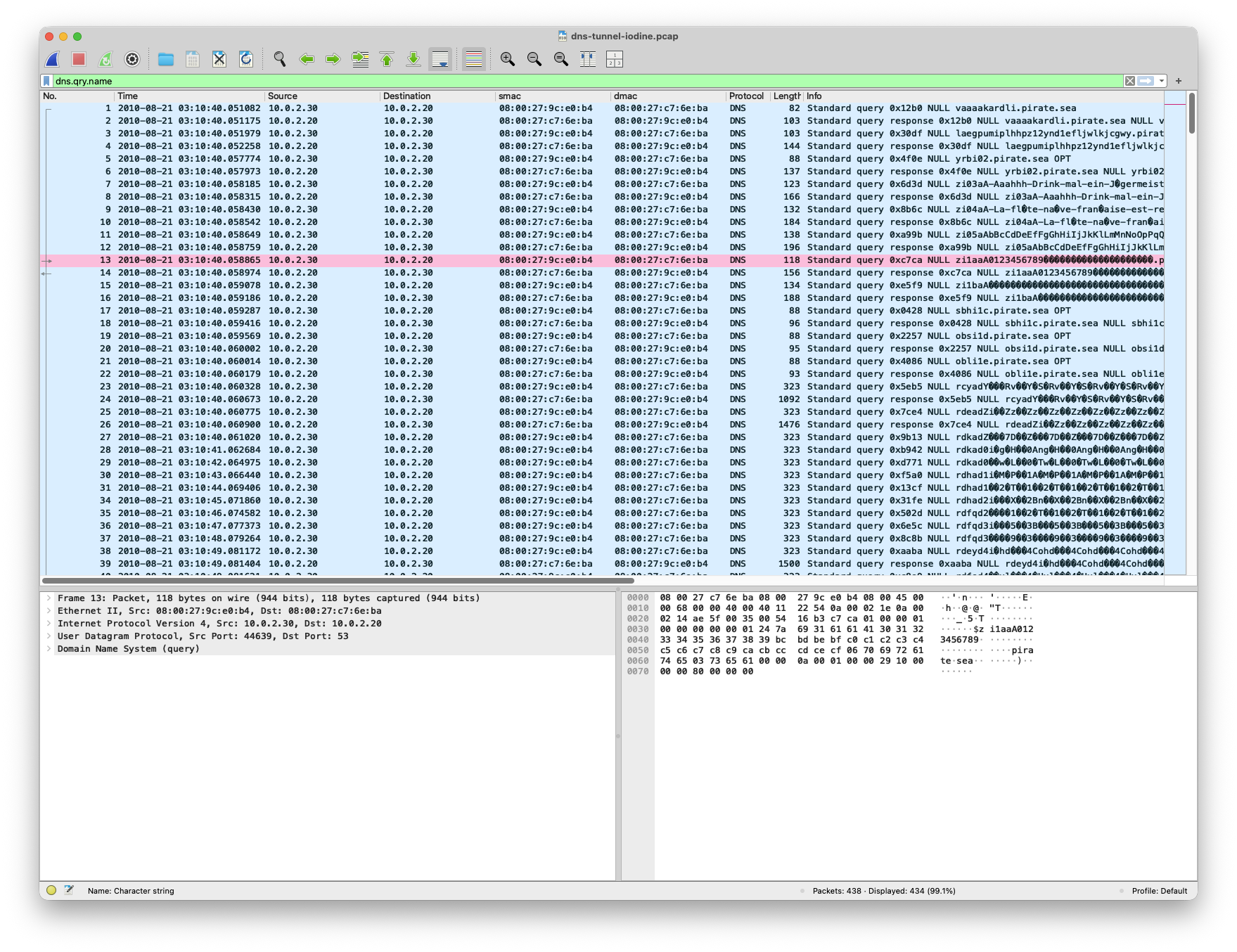
The exact format will depend on the configuration and version of the tunnelling tool, but the important thing is the pattern.
The query names don't look like typical hostnames.
We can now answer the Questions: * Host 10.0.2.20 is querying a DNS server at 10.0.2.30 * The queries all appear to be *.pirate.sea * All 434 packets happen between 03:10:40 03:11:04 which equates to 18 packets per second * There's no real pattern to the queries and they appear to be a mix of short english subdomains and large random character subdomains
Look at the changing subdomains
Now let's look at several queries together.
You should see that the main domain remains the same while the subdomain changes.
For example:
xxxxxxxx.pirate.sea
xxxxxxxx.pirate.sea
xxxxxxxx.pirate.sea
xxxxxxxx.pirate.sea
The actual values in our PCAP will be different, but the important characteristic is the same: we're seeing a large number of DNS requests using changing subdomains.
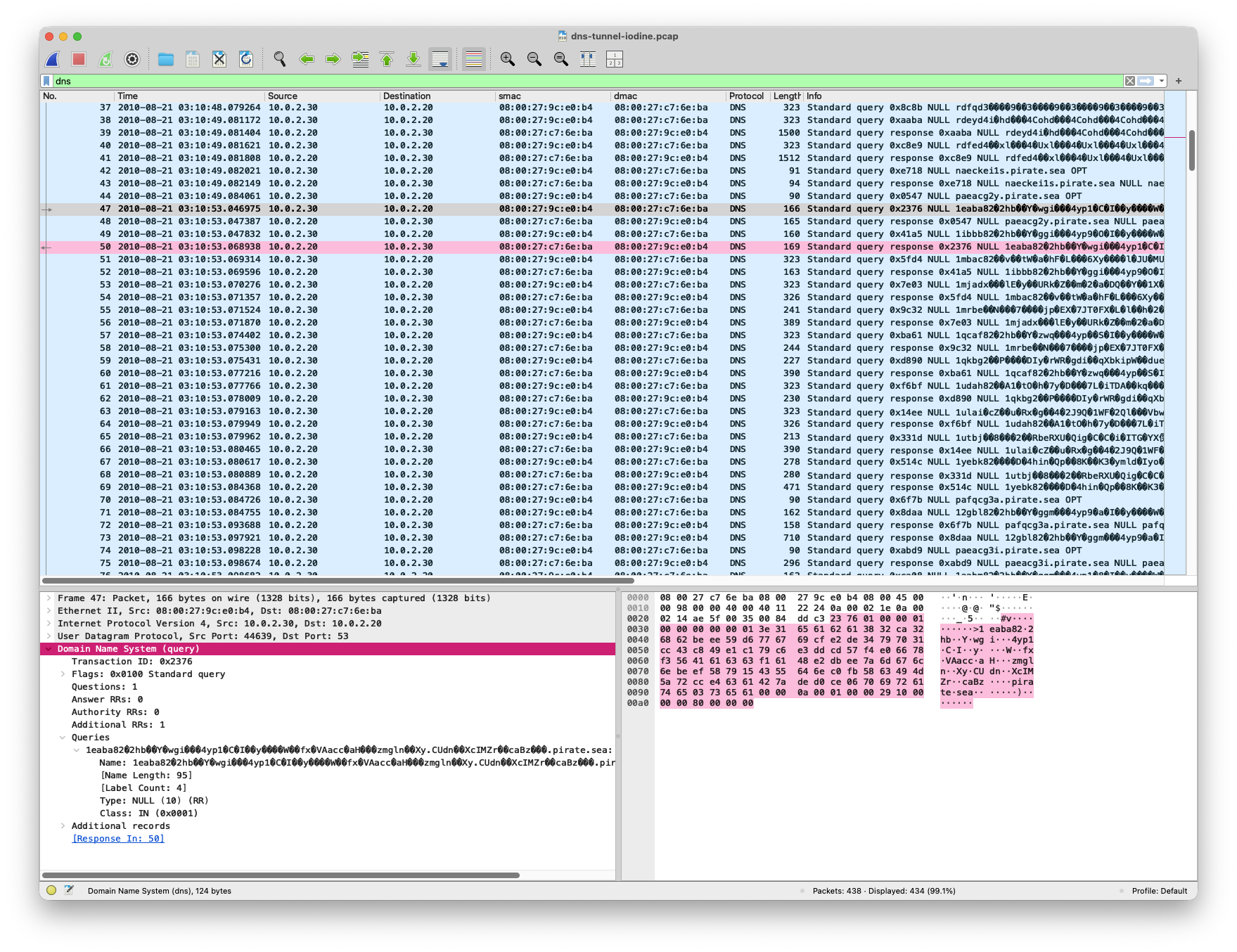
A normal application might repeatedly query the same domain, but a large number of constantly changing, apparently random subdomains deserves further investigation.
Why?
Because those changing labels can be used to carry data.
One DNS request carries a small amount of information. Another request carries another piece. Repeated over time, the requests can form a communication channel.
The query names look unusual
Let's take a closer look at one of the DNS queries.
Select a packet and expand the DNS section in the packet details pane.
You'll be able to see the queried domain and the individual DNS fields.
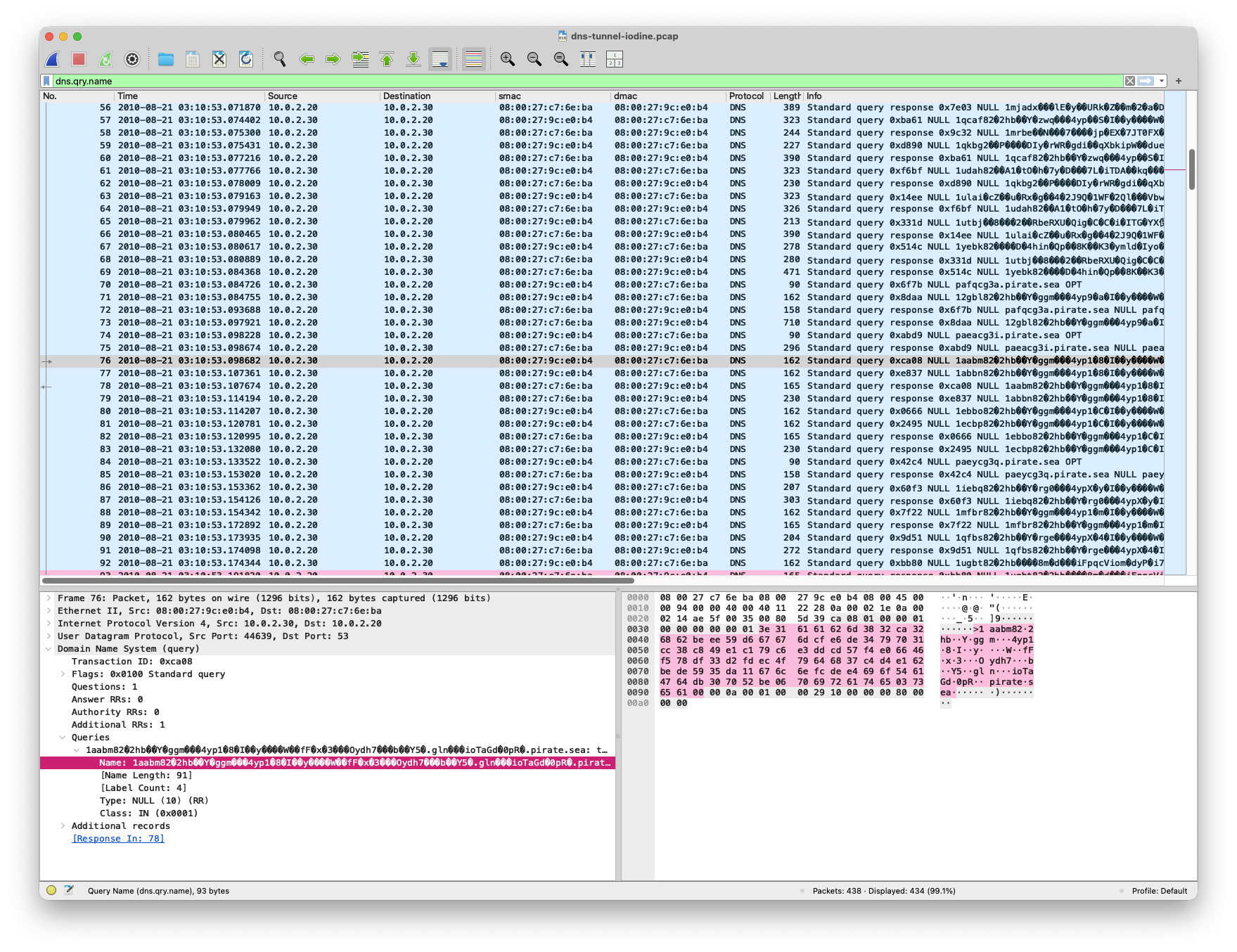
The query name is interesting for a couple of reasons.
First, it's much longer than the sort of hostname we'd normally expect to see.
Second, the label looks random or encoded rather than something meaningful like:
www
mail
api
vpn
This is common with tunnelling techniques because the attacker needs to turn the data into characters that can safely be transported through DNS.
It's important to be careful here, though.
A long or random-looking DNS name isn't proof of tunnelling.
Modern applications can generate long, random identifiers for completely legitimate reasons. We're looking for several indicators that point in the same direction.
Look at the traffic pattern
The next thing to consider is how frequently these requests are being sent.
If you have a large enough capture, Wireshark's statistics and graphing features can help make this easier to see.
To get this graph go to Statistics > IO Graphs with your display filter set to dnsand it will show you the number of packets over time.
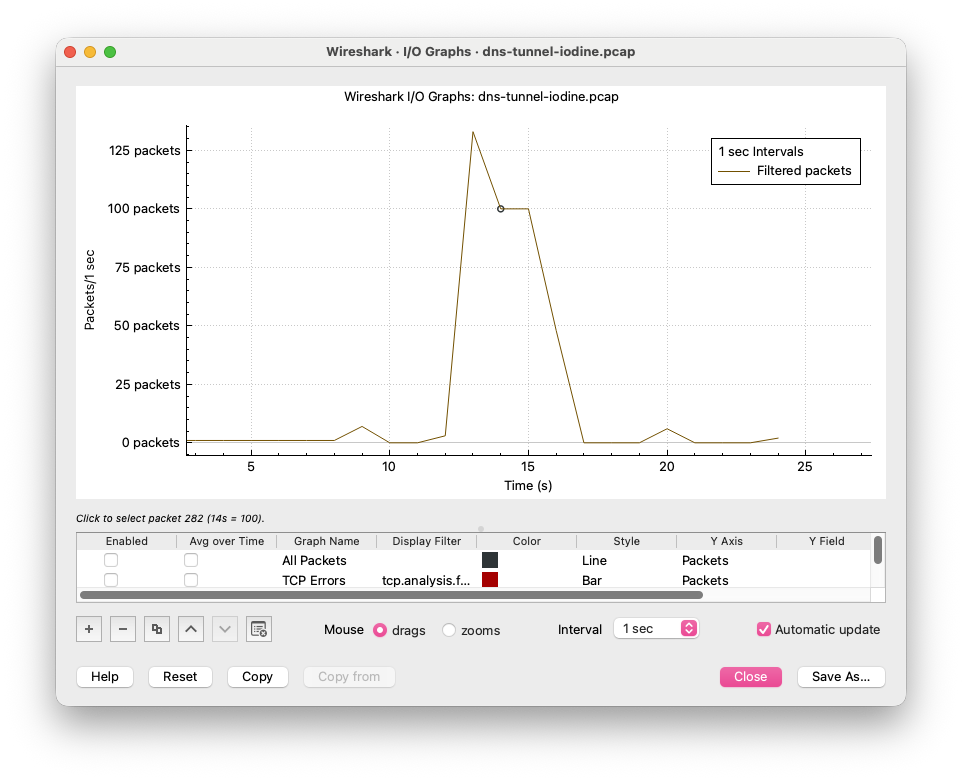
Rather than seeing an occasional DNS request, the Iodine traffic produces a repeated stream of DNS queries.
The exact timing will vary depending on the environment, but repeated DNS requests over a period of time can be consistent with a tunnelling channel.
A busy application can generate lots of DNS traffic without anything malicious happening.
The interesting part is the combination of:
- Repeated queries
- Changing subdomains
- Long query names
- Unusual-looking data
- The same parent domain
Together, these indicators are much more useful than any one of them on its own.
What about the DNS record type?
It's also worth looking at the type of DNS traffic being generated.
Wireshark exposes the query type through:
dns.qry.type
Common DNS record types are outlined in RFC1035 and they each have an integer QTYPE:
Name - QTYPE
A - 1
CNAME - 5
MX - 15
TXT - 16
You can filter for specific query types by adding the QTYPE value to your display filter:
dns.qry.type == 1 // A Record
Depending on the tunnelling setup, different record types can be involved, in our capture wireshark shows as an OPT record, but the packet dissection shows it to have QTYPE of 10 which is reserved as a NULL record for Experimental use
So, does this look like DNS tunnelling?
At this point, we have several clues.
| Indicator | What we're seeing |
|---|---|
| DNS traffic | Frequent, repeated requests |
| Query names | Long and unusual |
| Subdomains | Constantly changing |
| Domain | Repeated parent domain |
| Data | Appears encoded or random |
| QTYPE | Experimental records are extremely rare to see outside of development |
| Timing | Repeated communication over time |
None of these indicators is enough by itself.
But taken together, they give us a strong reason to investigate the traffic further.
What we've learned
Our Iodine PCAP gives us a good example of how DNS tunnelling can appear on the wire.
Using Wireshark, we can identify several useful indicators:
- A high volume of DNS queries
- Long query names
- Changing subdomains
- Repeated requests to the same domain
- Encoded or random-looking data
- A consistent communication pattern
The important thing isn't simply recognising Iodine itself, it's being able to see what normal looks like and seeing the technique and not the tool.
That's why packet analysis is so useful. Once you understand what normal DNS looks like, unusual patterns become much easier to spot.
Want to try it yourself?
Looking at a PCAP is a good way to analyse malicious behaviour on your network and build understanding of the protocols that underpin the modern internet.
We have multiple labs for you to try out to practise your PCAP investigative skills Haystack, sign up now to practice your skills.
