Windows Event ID 4625: How to Investigate Failed Logons
Every time someone fails to sign in to a Windows computer, Windows can write Event ID 4625 to the Security log. Most of these events are harmless: a user mistyped a password, or an old service still holds an expired one. A few are the first sign of a threat actor guessing passwords. This post shows you how to read a 4625 event, pull them out with PowerShell, and tell the two apart.
What Event ID 4625 records
Event ID 4625, "An account failed to log on", is written by the computer that checked the password. For a domain account on a workstation, that is the workstation. For a network logon to a file server, it is the file server. Microsoft documents every field on the Event 4625 reference page.
Windows only writes the event when failure auditing is on for the Logon subcategory. Check it from an elevated Command Prompt:
auditpol /get /subcategory:"Logon"
System audit policy
Category/Subcategory                      Setting
Logon/Logoff
  Logon                                   Success and Failure
If the setting says Success or No Auditing, you will see no 4625 events at all. In a domain, set it in Group Policy under Advanced Audit Policy Configuration, so every computer records the same thing.
The four fields that matter
A 4625 event has more than 20 fields. Four of them answer most questions:
- Account For Which Logon Failed. The account name and domain that someone tried to use.
- Failure Information. The
StatusandSub Statuscodes, which say why the logon failed. - Logon Type. How the logon was attempted, such as at the keyboard or over the network.
- Network Information. The
Workstation NameandSource Network Addressthe attempt came from.
The Sub Status code is the most useful of these. It separates a wrong password from an account that does not exist, which is the difference between a forgetful user and someone guessing names.
| Sub Status | Meaning |
|---|---|
0xC000006A |
The user name exists, but the password is wrong. |
0xC0000064 |
The user name does not exist. |
0xC0000234 |
The account is locked out. |
0xC0000072 |
The account is disabled. |
0xC0000071 |
The password has expired. |
0xC000006F |
The logon is outside the allowed hours. |
The logon type tells you where to look next. Type 2 is interactive (at the keyboard), 3 is network (a file share or similar), 8 is network with a clear-text password, and 10 is Remote Desktop.
Find 4625 events with PowerShell
Event Viewer works for one event, but you need a query to see a pattern. Get-WinEvent with a filter hash table reads the Security log quickly, because Windows filters the events before PowerShell sees them. Run this in an elevated PowerShell window:
$since = (Get-Date).AddHours(-24)
Get-WinEvent -FilterHashtable @{ LogName = 'Security'; Id = 4625; StartTime = $since } |
  ForEach-Object {
    $d = @{}
    ([xml]$_.ToXml()).Event.EventData.Data | ForEach-Object { $d[$_.Name] = $_.'#text' }
    [pscustomobject]@{
      Time      = $_.TimeCreated
      Account   = $d.TargetUserName
      SubStatus = $d.SubStatus
      LogonType = $d.LogonType
      Source    = $d.IpAddress
    }
  } | Format-Table -AutoSize
The script reads each field by its name from the event's XML, so it does not depend on the order of the fields. You can then group the results to find the noisy sources:
Get-WinEvent -FilterHashtable @{ LogName = 'Security'; Id = 4625; StartTime = $since } |
  ForEach-Object { ([xml]$_.ToXml()).Event.EventData.Data | Where-Object Name -eq 'IpAddress' } |
  Group-Object '#text' | Sort-Object Count -Descending |
  Select-Object Count, Name -First 10
Count Name
----- ----
  412 203.0.113.77
    6 192.0.2.25
    2 -
A source with hundreds of failures stands out at once. The - entry is a local logon, which has no network address.
If you only have Command Prompt, wevtutil reads the same log. This shows the five newest 4625 events as text:
wevtutil qe Security /q:"*[System[(EventID=4625)]]" /c:5 /rd:true /f:text
Tell a mistake from an attack
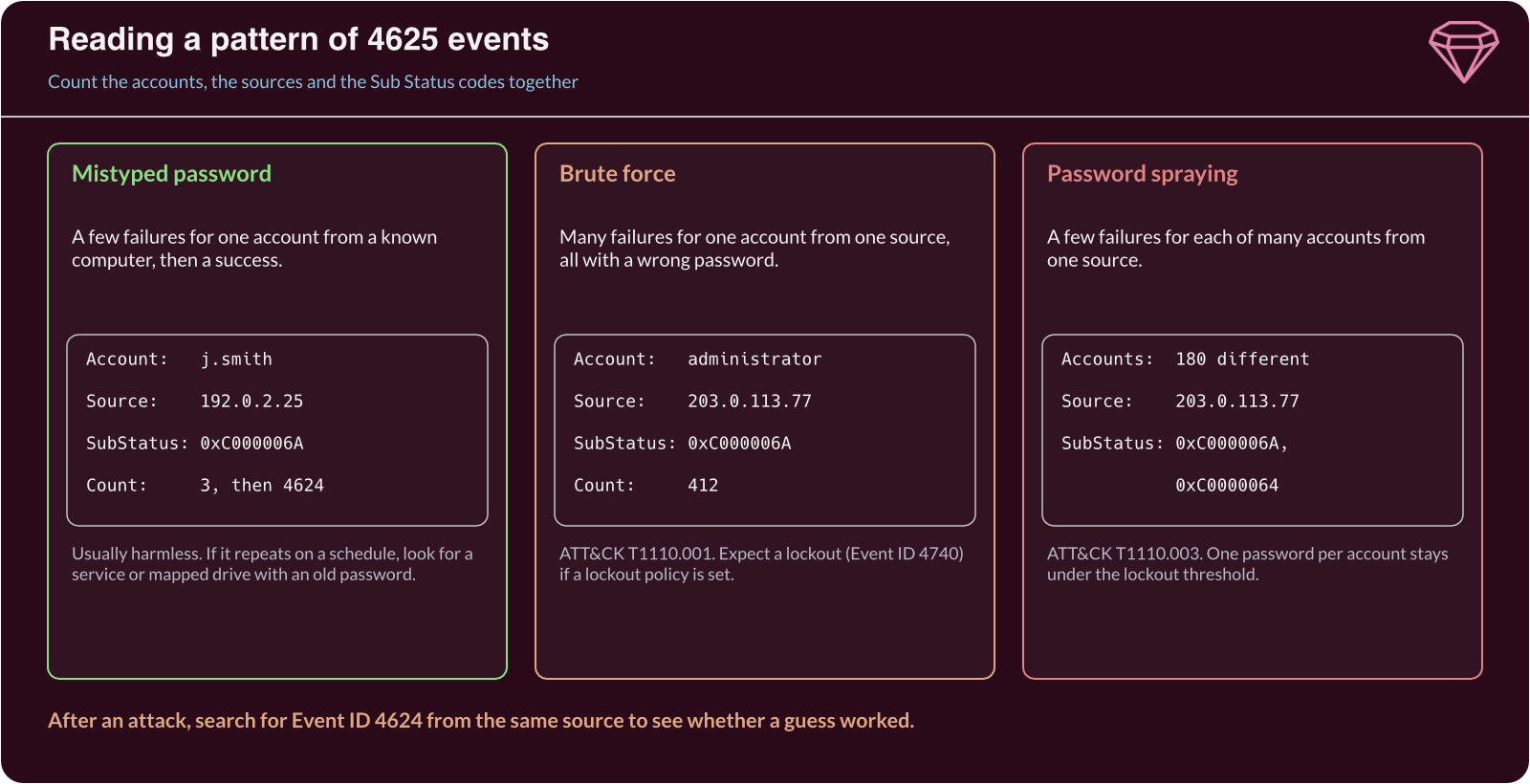
Once you have the events, look at three things together: how many accounts, how many sources, and which sub status codes.
A mistyped password gives a few failures for one account from one known computer, with 0xC000006A, usually followed by a successful logon. A service or mapped drive with an old password gives the same pattern, but it repeats on a schedule and often ends in a lockout.
Brute force gives many failures for one account from one source, all with 0xC000006A. MITRE ATT&CK lists it as Brute Force: Password Guessing (T1110.001). If the account locks, you will also see Event ID 4740 on the domain controller.
Password spraying gives a few failures for each of many accounts from one source. The threat actor tries one common password against every account, so no single account reaches the lockout threshold. Expect a mix of 0xC000006A and 0xC0000064, since some guessed names do not exist. ATT&CK lists it as Password Spraying (T1110.003).
What to do when you find an attack
The most urgent question is whether a guess worked. Search for Event ID 4624, a successful logon, from the same source address after the failures began:
Get-WinEvent -FilterHashtable @{ LogName = 'Security'; Id = 4624; StartTime = $since } |
  Where-Object { $_.ToXml() -match '203\.0\.113\.77' } |
  Select-Object TimeCreated, Id
If that returns any events, treat the account as compromised: reset its password, end its sessions and check what it did after the logon. If it returns nothing, block the source address at the firewall and confirm the targeted service should be reachable from there at all. Remote Desktop exposed to the internet is the most common cause of logon type 10 failures from unknown addresses.
Then reduce the chance that the next attempt works. Turn on multi-factor authentication (MFA) for remote access, set an account lockout policy, and check that the Audit Logon policy is the same on every computer. Forward 4625 and 4624 events to a central log or SIEM, so a spray across many servers shows up as one pattern rather than many small ones.
Further reading
- Event 4625 – Microsoft's reference for every field and status code.
- Event 4624 – The matching successful logon event and its logon types.
- Get-WinEvent – The PowerShell cmdlet and its filter options.
- Brute Force (T1110) – MITRE ATT&CK's description of password attacks and their detection.
